
If you’ve been shopping for streaming amplifiers or wireless speakers in the hi-fi space, you’ve probably seen the BluOS logo. It shows up on products from NAD, Bluesound, DALI, Monitor Audio, Cyrus, Roksan, Peachtree, and PSB. But what exactly is BluOS, and why does it matter for your music system?
BluOS explained
BluOS is a wireless multi-room audio operating system developed by Lenbrook, the company behind NAD Electronics and Bluesound. It handles music streaming, playback control, and multi-room synchronization across compatible devices.
The platform streams lossless audio up to 24-bit/192kHz over your home network, Wi-Fi, or Ethernet, with native support for high-resolution formats including FLAC, WAV, AIFF, and MQA. Unlike Bluetooth or AirPlay, BluOS transmits full-resolution audio without compression, which is why it appeals to listeners who care about sound quality.
Think of it as an operating system specifically designed for music. It lives inside compatible hardware and connects everything through a single control app.
The BluOS Controller app
The BluOS Controller app is how you interact with the platform. It’s available for iOS, Android, Windows, and macOS. Through the app, you can browse streaming services, access your local music library, control playback, adjust volume, group rooms, and configure settings, all from your phone, tablet, or computer.
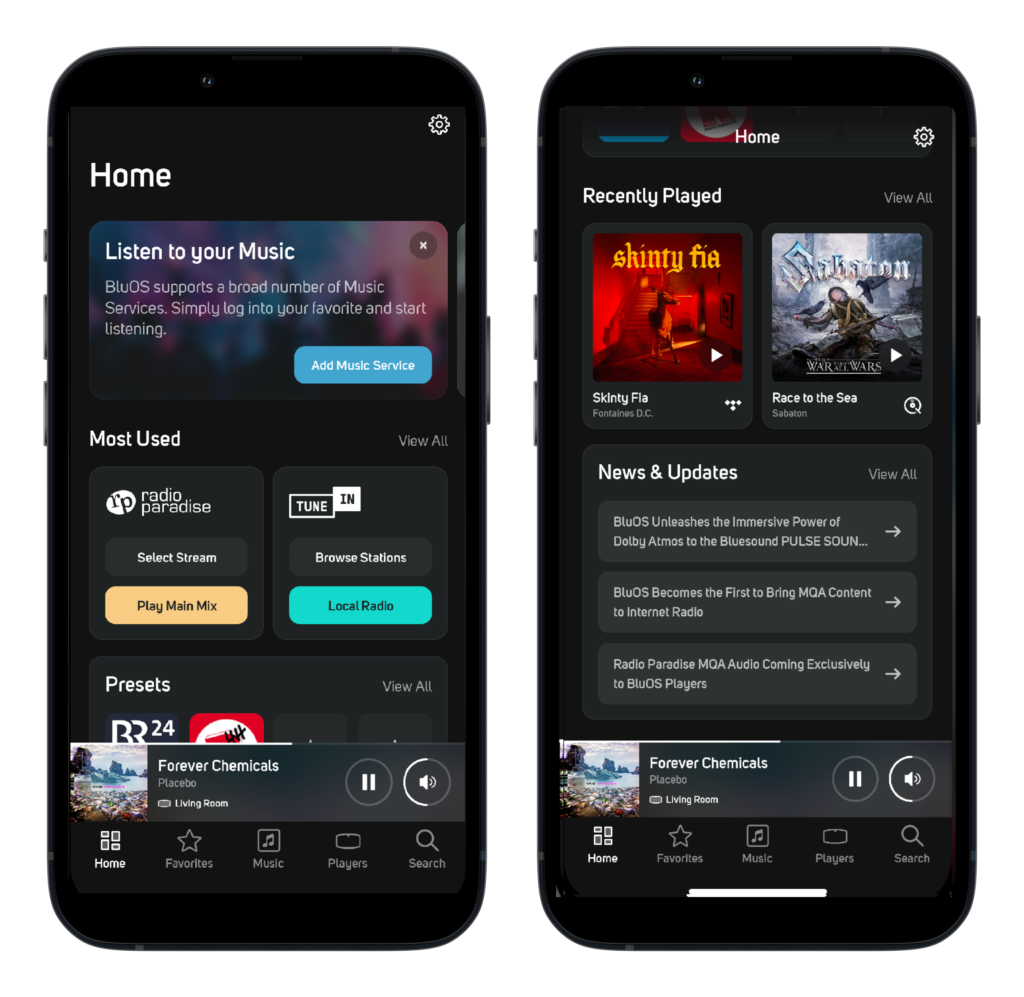
The interface organizes your music sources in one place: streaming services, internet radio, podcasts, and any music stored on network drives or USB storage connected to a BluOS device. You don’t need to jump between apps for different services.
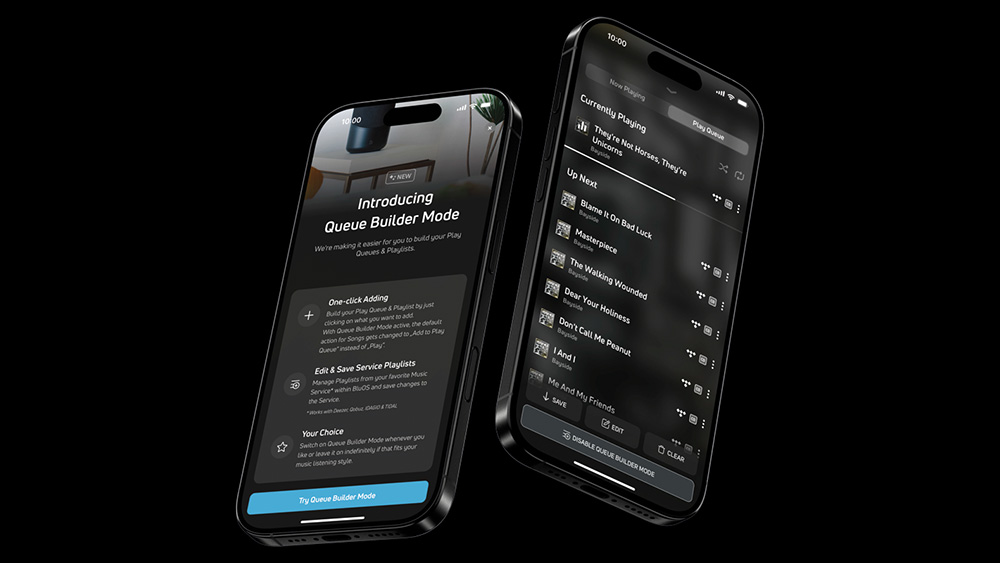
Recent updates have added features like Queue Builder Mode for playlist creation and a customizable home screen that surfaces your most-used functions.
Supported streaming services
BluOS natively integrates over 20 streaming services directly into the app. The major ones include:
- Tidal (including Tidal Connect)
- Qobuz (including Qobuz Connect)
- Spotify (free and premium)
- Amazon Music HD
- Deezer
- SiriusXM
- TuneIn Radio
- Radio Paradise (with exclusive MQA streaming)
- iHeartRadio
- Pandora
- nugs.net
- IDAGIO (classical)
- KKBOX
- HighResAudio
- Napster
- Calm Radio
The full list varies slightly by region due to licensing, but the core services are available in most countries. If a service isn’t natively integrated, you can still stream to BluOS devices via Bluetooth or AirPlay 2.
Multi-room audio
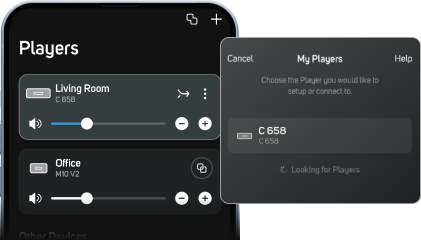
This is where BluOS is different. You can place BluOS-enabled devices throughout your home and control them as a unified system. Play different music in different rooms simultaneously, or group rooms together to play the same track in perfect sync.
The platform supports up to 64 zones, which is overkill for everyone but useful for commercial installations. Grouping and ungrouping rooms happens through the app with a tap. You can also stereo-pair compatible speakers for a wider soundstage in a single room.
All BluOS devices on the same network communicate with each other regardless of brand. A NAD amplifier in your living room can group with a Bluesound speaker in the kitchen and a DALI speaker in the bedroom,
BluOS Enabled vs BluOS Ready
You’ll see two designations on compatible BluOS products:
BluOS Enabled means the device has BluOS built in. It streams out of the box with no additional hardware required. Examples include the Bluesound NODE Icon, NAD M33, NAD C 3030S, and DALI Sound Hub.
BluOS Ready means the device can accept a BluOS module as an upgrade. NAD’s modular amplifiers (like the C 388, C 399, and M10) fall into this category; you can add an MDC2 BluOS-D card to unlock streaming functionality.
Smart home integration
BluOS works with major smart home control systems, including Control4, Crestron, RTI, URC, Lutron, and Josh.ai. For voice control, it supports Amazon Alexa, Google Assistant, and Apple Siri.
You can ask your voice assistant to play music, skip tracks, adjust volume, or target specific rooms. The integration depth varies by platform, but basic playback control works across all supported assistants.
Hardware partners
BluOS started as a Lenbrook technology, but the company licenses it to other manufacturers. Current hardware partners include:
- Bluesound: Lenbrook’s dedicated wireless audio brand (NODE, POWERNODE, PULSE speakers, VAULT)
- NAD Electronics: Amplifiers and streamers across the Classic and Masters series
- DALI: The Danish speaker manufacturer integrates BluOS into select products
- Monitor Audio: British speaker brand with BluOS-enabled components
- Cyrus Audio: UK hi-fi manufacturer
- Roksan: British turntable and amplifier maker
- Peachtree Audio: American integrated amplifier brand
- PSB Speakers: Another Lenbrook brand, a Canadian loudspeaker manufacturer
How BluOS compares
The main competitors of BluOS are Sonos, HEOS (Denon/Marantz), and Roon.
Sonos is more mainstream and has broader brand recognition, but its ecosystem is closed; you can only use Sonos hardware. BluOS works across multiple brands.
HEOS is Denon and Marantz’s platform, similar in concept but limited to those brands.
Roon is the audiophile’s choice for library management and metadata, but it requires a separate subscription and typically runs on a dedicated server. BluOS is simpler, no subscription and no extra hardware.
Who is BluOS For?
BluOS is the best option for you if you want high-resolution streaming without a complicated setup. It’s particularly appealing if you’re building a system around NAD or Bluesound hardware, or if you want multi-room audio.
Frequently Asked Questions
Is BluOS free?
Yes, BluOS itself has no subscription fee. The app is free to download, and there’s no ongoing cost to use the platform. However, you do need BluOS-compatible hardware, and any premium streaming services (like Tidal or Qobuz) require their own subscriptions.
Can I play Apple Music on BluOS?
Apple Music is not natively integrated into BluOS. However, you can stream Apple Music to BluOS devices using AirPlay 2, which is supported on most current BluOS hardware. The audio is transmitted wirelessly from your iPhone, iPad, or Mac to the BluOS player.
How do I update BluOS?
BluOS updates automatically when new firmware is available. When you open the BluOS Controller app, it will prompt you if an update is ready for your devices. You can also manually check for updates in the app under Settings > Players > [Your Device] > Update.
How do I connect BluOS to my TV?
Many BluOS-enabled devices include HDMI eARC or optical inputs for TV connection. Connect your TV’s audio output to the BluOS device using HDMI eARC (preferred for best quality) or an optical cable. The BluOS device then acts as your TV’s sound system while retaining full streaming capabilities.
- NAD C 3030 and C 3030S bring back vintage HiFi
- Samsung expands 2026 audio lineup with new soundbars and Wi-Fi speakers
- Tribit PocketGo vs JBL Go 4: Which budget speaker delivers better value?
- Tribit Pocket Go brings Bluetooth 6.0 and MicroSD playback to the budget sector
- Connected Fidelity launches CF-1010 9-Inch tonearm